
You might have wondered that you can use methods like forEach() on the output you got from querySelectorAll(), but on the other hand when you use getElementsByTagName() you can't use methods like forEach().
Confusing right! but don't worry after reading this blog you will know why this happens.
We will be using this example to understand better:
<!DOCTYPE html>
<html lang="en">
<head>
    <meta charset="UTF-8">
    <meta name="viewport" content="width=device-width, initial-scale=1.0">
    <title>HTMLCollection v/s NodeList</title>
    <link rel="stylesheet" href="style.css">
</head>
<body>
    <h1 id="heading1">Difference</h1>
    <p id="para1">Lorem, ipsum dolor sit amet consectetur adipisicing elit. Nam, ipsa.</p>

    <ul id="list1">
        <li class="item">1</li>
        <li class="item">2</li>
        <li class="item">3</li>
        <li class="item">4</li>
        <li class="item">5</li>
    </ul>
    <script src="main.js"></script>
</body>
</html>
HTMLCollection
It is a collection of DOM element nodes(Element Nodes HTML element like
,
, etc) only, it means that this doesn't includes the nodes like comment nodes, attribute nodes etc.
These are generally obtained through methods like document.getElementsByTagName() or the children property.
const collectionList = document.getElementsByTagName("li")
console.log(collectionList);

// HTMLCollection(5) [li.item, li.item, li.item, li.item, li.item]

collectionList.length;

// 5
Here you can see that the HTMLCollection looks like an array, but be careful as this is not array although it can be said array-like.
They support numeric indexing (e.g. list[0]) and have a read-only .length property.
NodeLists
They are collection of DOM nodes
It is typically returned by methods like element.childNodes or document.querySelectorAll()
const nodeList = document.querySelectorAll(".item")
console.log(nodeList);

// NodeList(5) [li.item, li.item, li.item, li.item, li.item]

nodeList.length;

// 5
This is also array-like but array, it also support numeric indexing (e.g. list[0]) and have a read-only .length property.
Differences Between Them
These looks same, but they differ from each other on these aspects:
Content
HTMLCollections include only element nodes, in document order. In contrast, NodeLists can include any node types – for example, element.childNodes returns a NodeList including text nodes (even whitespace) as well as elements. For instance, div.children returns an HTMLCollection of only element children, whereas div.childNodes returns a NodeList of all node children (elements plus text/comment nodes).
Example:
<div>
  This is a text
  <p class="paragraph">First paragraph</p>
  <p class="paragraph">First paragraph</p>
  <!-- this is a comment -->
</div>
Here is a div with a text node, two element nodes (paragraphs) and a comment node. Each paragraph also has a text node.
Assuming you wanted to get only the element nodes in the div, you can use the children property on the div. And it will return an HTMLCollection containing only the element nodes.
But if you wanted all the nodes and not just the element nodes, then you can use the childNodes property to get all the nodes.
const divElement = document.querySelector('div')

console.log(divElement.children) // returns an HTMLCollection
console.log(divElement.childNodes) // returns a NodeList

The HTMLCollection has two items: the paragraph element nodes. Whilst the NodeList includes the first text and the two paragraphs and their text contents, and the comment node too.
Live vs. Static: A Key Difference
Because HTMLCollections are live, their contents automatically change with the DOM. For example, starting with 3 <p> elements:
const paras = document.getElementsByTagName('p');
console.log(paras.length); // 3

document.body.appendChild(document.createElement('p'));
console.log(paras.length); // now 4, the collection auto-updated
The console (below) illustrates this live behavior. The HTMLCollection grows from 3 to 4 after adding a <p>.

A live HTMLCollection updates automatically. Before appending a <p>, the console shows HTMLCollection(3). After appending, it shows HTMLCollection(4).
By contrast, a NodeList from querySelectorAll() would stay at 3 in the above example, because it is static. Changes in the DOM do not appear in that NodeList (unless you run querySelectorAll() again). In other words, HTMLCollection is always live, whereas NodeLists may be live or static depending on how they were created. A NodeList from element.childNodes or some getElements* methods is live, but the NodeList from querySelectorAll() is static (it does NOT update after creation).
Iterating and Array Methods
Neither NodeList nor HTMLCollection is a true Array, so many array methods (like map, filter, push, etc.) aren’t available by default. You cannot do collection.map(...) on either. Instead, you can often loop over them:
NodeList: Modern NodeLists are iterable and support
forEach(). For example:const boxes = document.querySelectorAll('.box'); // a NodeList boxes.forEach(box => console.log(box)); // worksThe above works because NodeList has a
forEachmethod. However, this method is not in older browsers (e.g. IE11’s NodeList lackedforEach), so in very old environments you might polyfill it or use a loop.HTMLCollection: Live HTMLCollections do not have
forEach. Attemptingcollection.forEach(...)on an HTMLCollection throws an error. To loop over an HTMLCollection, you can use a classicforloop or a modernfor...ofloop (HTMLCollections are iterable in modern browsers), e.g:const elems = document.getElementsByClassName('item');// HTMLCollection for (const el of elems) { console.log(el); }Alternatively, you can convert to an Array first:
const elemsArray = Array.from(document.getElementsByClassName('item'));
elemsArray.map(el => /* ... */);
Converting (e.g. via
Array.from) gives all array methods. MDN specifically notes that since HTMLCollections update live, it’s often a good idea to copy them (usingArray.from) if you need to iterate while modifying the DOM.
Named access
HTMLCollections have extra ways to access items. In addition to numeric indexing, an HTMLCollection supports a namedItem(nameOrId) method (and even direct property access by id or name). For example, if <button id="btn1"> is in the collection, then buttons.namedItem("btn1") (or buttons.btn1) returns that element. NodeLists do not have named access; they only support numeric indexing.
Inshort, Only HTMLCollections support named access (e.g. collection.namedItem("id") or collection["id"]). NodeLists only allow index access.
For Example:
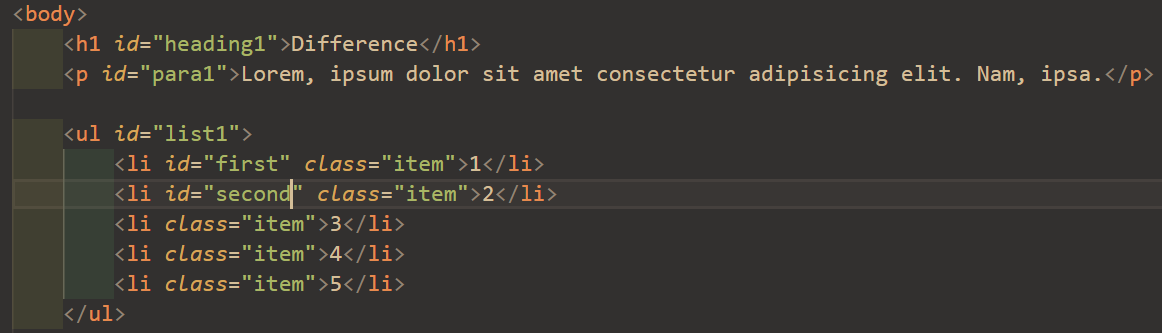
const collectionList = document.getElementsByTagName("li")
console.log(collectionList.namedItem("first"));
console.log(collectionList["second"]);
Output:

Conclusion
Be careful while using loops on these two, and use the methods according to your usecase.
About the author
I am learning Web Dev, and i write to enrich my skills and learnings.
Comments
Join the discussionNo comments yet. Be the first to comment.


